
What Is MCP and Why Should You Care?
If you’ve ever tried wiring up an AI agent to send an email, update a database, and maybe book your dentist appointment (yes, even that), you’ve probably been blindsided by the horror that is manual configuration. Each integration is a little snowflake—quirky, picky, and requiring hours of careful setup.
Enter Model Context Protocol (MCP), your AI agent’s universal translator.
MCP is not a product. It's not an app. It's not even particularly shiny. It's a standardized protocol that tells your AI how to talk to the many tools it might want to use—without you having to hand-hold it through the process every single time.
It's like giving your AI a cheat sheet for every tool you want it to use.
From Frustration to Flow - The Problem MCP Solves
Here’s the thing: AI agents are almost smart.
You say: “Add this customer to my CRM.”
AI says: “...Uhhh, can you tell me which CRM? And how to log in? And what field to use? Also what’s a CRM?”
This is where most builders lose hours—or their sanity—setting up tools node by painful node. Want to add a Google Calendar event? Cool. That’s 10 minutes. Now do it again for deleting, updating, listing... You get the idea.
MCP’s promise: Set it up once, use it infinitely.
Instead of making your AI memorize every command in 12 different dialects, MCP says, “Hey AI, here’s a menu of everything you can do—figure it out.” And, shockingly, it does.
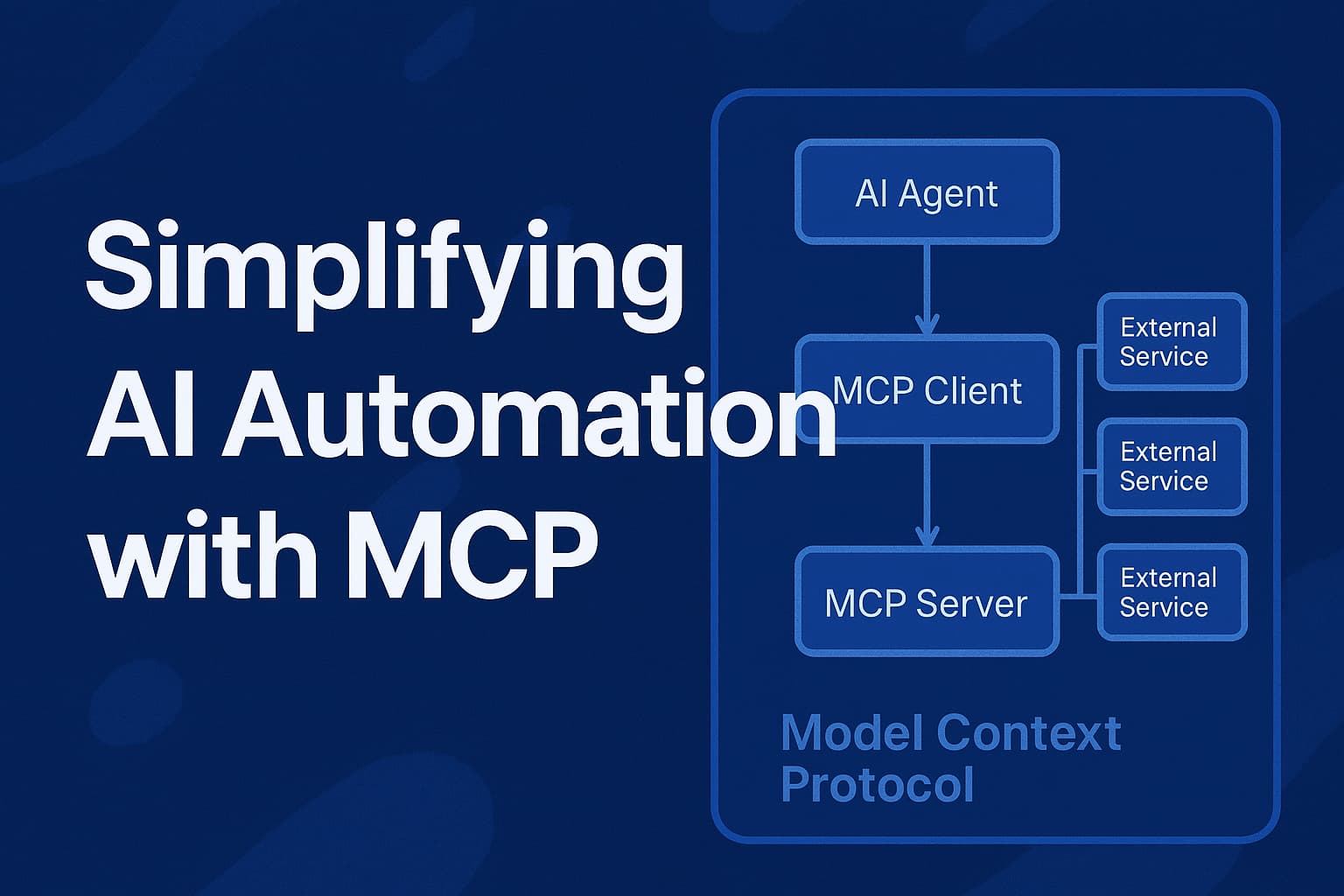
The Magic Trio - MCP Client, MCP Server, and External Services
To understand the wizardry, let's break it down into the three main components:
🧠 1. MCP Client
- Lives inside your AI environment (like N8N).
- Acts as a middleman between your chatbot and the outside world.
- Cleans, sanitizes, and packages requests before sending them anywhere. Think of it like your AI’s personal PR team.
🔌 2. MCP Server
- The powerhouse. Holds a list of all the tools and endpoints your AI can access.
- Converts tool calls into actual API requests to send to services like Gmail, ClickUp, or PostgreSQL.
🌐 3. External Services
- Resources:
These are your “read-only” data points. Think of them like GET requests with zero commitment. Claude can use them to understand the current state of things, like pulling all the horse profiles that scream “emotionally available.” - Tools:
These are your “do something” endpoints — write to a database, update a relationship status, or set two horses up on a candlelit hayride. They’re your RESTful POSTs, packaged for the LLM to trigger… with nothing more than a prompt and a little trust.
The flow is simple but effective:
AI makes a request → MCP Client formats it → MCP Server handles it → External tool executes it → Result returned.
All without your sweaty hands dragging and dropping node fields.
A Tale of Two Workflows: Before vs. After MCP
🧟 Before MCP:
- You build a separate node for every single action.
- You configure every parameter manually.
- You debug broken workflows when APIs update.
- You cry a little. Then go make coffee. Then cry again.
🧙 After MCP:
- One connection to a “tool family” (e.g., Google Calendar).
- AI has access to all the actions under that umbrella.
- No more mapping fields or writing request payloads.
- Everything happens dynamically, at runtime.
Think of it like upgrading from a flip phone to a smartphone. It’s not just sleeker—it fundamentally changes what you can do.
Real-Life Use Case: N8N + MCP = Peace of Mind
Nick (your friendly neighborhood AI system builder) ran us through an example using N8N, a no/low-code automation platform.
🚫 Without MCP:
- Five different Google Calendar tools.
- Five separate node setups.
- Credentials, tool descriptions, start/end times… every single time.
✅ With MCP:
- One MCP node connects to Google Calendar once.
- AI gets the whole buffet of tools to choose from.
- No configuration needed for each specific task.
- You build smarter, not harder.
It's the automation equivalent of switching from doing your taxes by hand to having an accountant who knows exactly what to do and just asks you to sign at the bottom.
Why MCP Is Actually a Big Deal (Even If It Sounds Boring)
MCP is hitting critical mass because it solves an actual pain point. Not the kind of "we made a new crypto token for dating apps" hype-pain. Real-developer pain. Workflow pain. "Why won’t my damn bot send the email?" pain.
🔥 Key Benefits:
- Standardization: No more wild west of API inconsistencies.
- Efficiency: Build once, use repeatedly.
- Accuracy: Fewer errors, fewer edge cases.
- Future-proofing: Even if a tool changes, the server keeps your workflow intact.
- Scalability: AI agents can now realistically access thousands of tools.
As more developers and services adopt MCP, the more it becomes the de facto glue holding your AI workflows together.
Future of AI Automation - Higher Abstractions, Less Suffering
MCP is just the beginning. On the horizon, we’ve got:
- MCP Compass: A high-level node that chooses the right tool family and the specific tool for you.
- Smarter agents: LLMs that dynamically select tools, map parameters, and validate outputs.
- Community-driven servers: Anyone can contribute tool sets, meaning your AI could soon hook into anything from Notion to your smart fridge.
The dream of “just tell your AI what to do and it does it” is creeping closer. MCP is a major step toward that reality—not because it’s flashy, but because it’s foundational.
Less Hype, More Help
MCP doesn’t promise the moon. It doesn’t claim to be sentient. What it does offer is a practical, scalable, and actually elegant solution to a stupidly annoying problem. And in the world of AI automation, that makes it revolutionary.
If you're serious about AI, automation, or keeping your sanity intact, learning MCP isn’t optional anymore. It’s inevitable. Just like your AI finally working the way you thought it would the first time.

Comments